
What if you could automate your wealth without ever losing a wink of sleep over security? Most people think letting an app touch their money is a recipe for disaster. You've heard the horror stories about unauthorized transfers and glitchy algorithms. It's frustrating. You want to save more, but you don't want to hand over the keys to your financial life. The average American loses $329 a year to banking fees; you shouldn't have to lose your peace of mind too.
The truth is that you can securely link bank accounts for automatic savings in 2026 while keeping total control. Thanks to the CFPB’s new open banking rules, you have more power over your data than ever before. This guide will show you the exact steps to connect your accounts using a permission-first model. You'll learn how to put your money to work and automate your 2026 financial plan without ever letting a single cent move without your explicit approval. It's time to stop worrying about the tech and start watching your balance grow. We will break down the new security standards and the simple steps to get started today.
Key Takeaways
- Account linking is an encrypted bridge between your banks. It replaces outdated automation with a dynamic system that actually adapts to your life.
- Learn how to securely link bank accounts for automatic savings by verifying aggregators and using Multi-Factor Authentication every time.
- Automation is not a blank check for an algorithm. The permission-first model ensures that no money moves without your explicit approval.
- Stay safe in 2026 by auditing your linked accounts quarterly. Use a dedicated AI assistant to keep your entire financial plan in one secure view.
Understanding Account Linking: Why Your Wealth Needs a Secure Connection
Stop thinking of account linking as a digital chore. It’s an encrypted bridge. This connection lets your financial tools talk to each other without you playing middleman. In the past, you had to log in, download a CSV, and pray the math was right. Not anymore. When you securely link bank accounts for automatic savings, you aren't just connecting apps; you're building a financial command center.
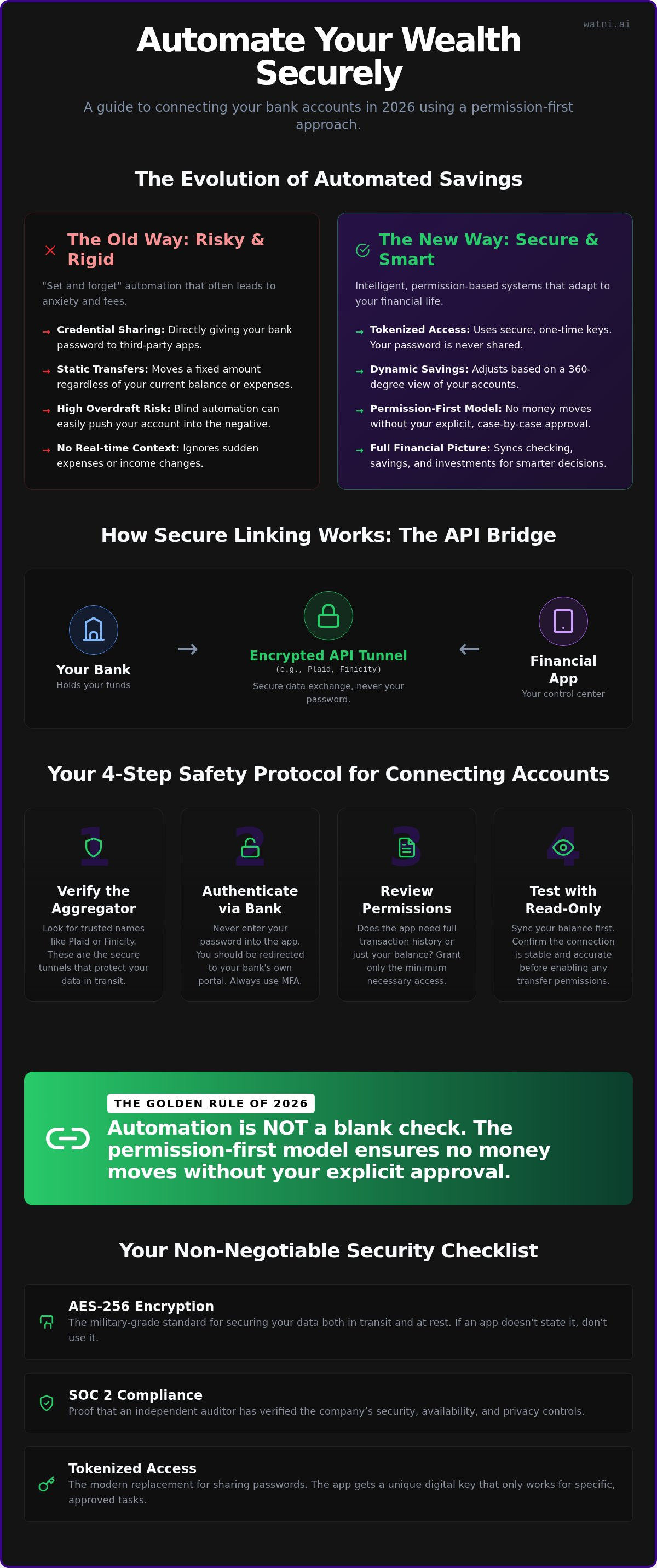
Old-school automation is "set and forget." That’s a trap. Life isn’t static, so your savings shouldn’t be either. Traditional transfers don't care if you just had a car repair or a surprise bonus. They just move money regardless of your balance. That leads to anxiety, or worse, overdraft fees. To truly securely link bank accounts for automatic savings, you need a system that sees the whole picture. Wealth building in 2026 requires a 360-degree view of your checking, savings, and brokerage accounts. This isn't about giving an algorithm a blank check. It’s about shifting to intelligent, permission-based automation where you keep the control while the tech handles the heavy lifting.
The Role of APIs in Modern Finance
Think of an API as a secure handshake. It allows your bank to share specific data with your financial app without ever exposing your actual login credentials. You should never share your actual bank password with a third-party app. If an app asks for it, it's living in the past. Modern security relies on encrypted tokens, not your secret phrases. An API is a secure, read-only data conduit used by 90% of fintech apps. It’s the industry standard for a reason. It keeps your data moving while keeping your vault locked tight. This ensures your financial assistant can see what it needs to see, and nothing more.
A Step-by-Step Guide to Safely Connecting Your Financial Accounts
Don't just click "Allow" and hope for the best. Connecting your money requires a methodical process. To securely link bank accounts for automatic savings, you need to act as the gatekeeper. It’s about building layers of defense before a single dollar moves.
- Step 1: Verify the aggregator. Look for trusted names like Plaid or Finicity. These are the specialized, secure tunnels that move data between your bank and your app. They're the industry standard for a reason.
- Step 2: Authenticate through your bank. Never type your bank password directly into a third-party app. You should be redirected to your bank’s own portal. Use Multi-Factor Authentication (MFA) every single time. It’s an extra ten seconds that prevents a lifetime of headaches.
- Step 3: Review the permissions. Most apps ask for more than they need. Does the app need your full transaction history or just your current balance? Know exactly what data is being requested before you hit confirm.
- Step 4: Test with "read-only" sync. This is the secret to 2026 security. Sync your balance first. See how the data displays. Only enable transfer permissions once you're confident the connection is stable and accurate.
Security Standards to Look For
Demand AES-256 encryption. It’s the military-grade standard for data in transit. If an app doesn't explicitly mention it, it isn't safe. You should also look for SOC 2 compliance. This certification proves that an independent auditor has verified the company’s security controls. Finally, understand the shift from "Credential Sharing" to "Tokenized Access." Sharing your password is a relic of the past. Tokenization uses a unique digital key that only works for one specific app. If you want a partner that prioritizes this level of safety, explore our permission-first platform.
The 2026 Checklist for Secure Linking
The rules of the game have changed. Use this checklist before you connect any new financial tool. If the app doesn't require MFA, walk away immediately. Look for an "Explicit Approval" toggle for transfers. This ensures the app can't move money without your "yes" for every transaction. Most competitors ignore this distinction, but it's the difference between being in control and being at the mercy of an algorithm. You can read more about safe financial automation to keep your assets protected as you grow your wealth.
Beyond Encryption: The Permission-First Approach to Financial AI
Automation isn't a blank check. Most financial apps treat your savings like a recurring bill. They pull money on a fixed schedule regardless of what’s happening in your life. That’s not wealth building. It’s a liability. When you securely link bank accounts for automatic savings, you deserve a system that respects your boundaries. You need a partner that finds the math but waits for your "go" before acting.
The Permission-First Model is the ultimate security feature. It turns the traditional "set and forget" trap on its head. Instead of a blind algorithm moving money behind your back, the AI acts as a scout. It scans your accounts and identifies the perfect moment to save. But it stops there. It presents the opportunity, and you provide the final "yes." This approach ensures you never lose control of your liquidity.
This is where AI truly shines. By analyzing your personalized financial roadmap, the technology finds savings opportunities you might have missed. It looks across your checking, savings, and brokerage accounts to see the full picture. Traditional automation is blind. It moves money because it was told to three months ago. AI automation is context-aware. It moves money because it makes sense today.
Why Human Approval is the Final Security Layer
Algorithms are great at math, but they're terrible at life. An AI might see an extra $500 in your checking account and think it’s time to invest. But it doesn't know your best friend’s wedding is next weekend. You do. Human approval provides the context that data alone can't capture. It prevents "accidental" transfers during low-cash flow weeks or unexpected life events.
We believe in bridging the gap between AI speed and human control. You get the efficiency of a high-tech assistant without the anxiety of a runaway script. It’s about building wealth on your terms. If you're ready to experience a smarter way to grow your money, start your permission-first journey today.
Starting Your Automated Journey: Best Practices for 2026
Security isn't a one-time event. It’s a recurring habit. If you want to securely link bank accounts for automatic savings, you have to stay active in the process. Don't let your digital footprint grow unchecked. Audit your linked accounts every quarter. If you haven't used an app in three months, kill the connection. It’s that simple. Centralize your financial life with an ai powered personal finance assistant. One dashboard is always better than ten scattered apps.
Set up real-time alerts for everything. You should get a notification for every successful transfer and every new approval request. If money moves, you should know about it instantly. Focus on goal-based linking. Don't just connect accounts for the sake of it. Link the specific institutions that serve your 2026 wealth targets, whether that's a high-yield savings account or a dedicated retirement fund. This keeps your automation purposeful and easy to track.
Maximizing Your Automated Savings
Don't stop at your checking account. Link your brokerage to fuel ai driven investment plans. This creates a seamless flow from earning to investing. Make wealth building a five-second daily ritual. We call it the "Approval Habit." When the notification hits your phone, review the math, tap "yes," and get back to your day. It’s the fastest way to grow your net worth without sacrificing an ounce of control. Ready to start? Let us build your automated wealth building strategy and move beyond the set-and-forget trap.
Take Command of Your 2026 Wealth Strategy
You have the blueprint. Linking your accounts isn't a gamble; it's a strategic move for your future. You've learned how to verify secure aggregators. You understand why tokenized access beats password sharing every time. Most importantly, you now know that real security means never moving a cent without your explicit "yes." It's about combining high-speed AI with your personal context to ensure your money is always where it needs to be.
Don't let tech anxiety hold your savings hostage. When you securely link bank accounts for automatic savings, you're deploying a protective ally that works around the clock. We use bank-level AES-256 encryption to ensure your data stays private. There are no human advisors here to judge your spending or complicate your plan; it's just pure, intelligent automation designed for results. You keep the control. We handle the complexity.
Your financial roadmap is ready for execution. Build your personalized financial plan with Watni today. Our permission-first AI model ensures you approve every single move before it happens. It's time to watch your balance grow with total peace of mind. You're in charge now.
Frequently Asked Questions
Is it safe to link my bank account to a third-party savings app?
It's safe if you use apps that prioritize modern security standards like AES-256 encryption. These tools don't store your actual bank login. Instead, they use secure tokens to communicate with your bank. You should always verify that the app uses a trusted aggregator like Plaid. This ensures you can securely link bank accounts for automatic savings without exposing your primary credentials to potential bad actors.
What happens if a linked financial app gets hacked?
Your money is shielded because modern apps use tokenized access rather than storing your password. If a breach occurs, the specific digital key used by that app becomes useless once revoked. You should immediately log into your bank's portal and disconnect the app's access. This kills the connection instantly. You aren't at risk of a total account takeover because the hacker doesn't have your master login details.
Can an app withdraw money from my bank account without permission?
An app can only move money if you've explicitly granted it transactional or write access during the setup process. However, the best way to securely link bank accounts for automatic savings is to use a permission-first platform. This ensures the app must ask for your approval before every single transfer. Without your final yes in the app, the money stays exactly where it is. You remain the ultimate gatekeeper.
Does linking my bank accounts affect my credit score?
Linking your accounts has zero impact on your credit score. This is a data-sharing connection, not a credit application. Banks and aggregators don't report these links to credit bureaus like Experian or Equifax. It's simply a way for your financial tools to see your balance and help you save. You can connect or disconnect as many accounts as you want without worrying about your rating.
What is the difference between read-only and transactional access?
Read-only access is like a window; the app can see your balance and transactions but can't touch anything. It’s perfect for budgeting and planning. Transactional access is like a key; it gives the app permission to initiate transfers between your linked accounts. Most apps start with read-only data. You should only enable transactional permissions when you're ready to automate your wealth and have a permission-first system in place.


